- Client-side media processing now runs directly in the browser
- New Notes functions
- The admin interface has gotten several updates
- An update with many new features
- Real-Time Collaboration is missing – again
WordPress 7.1 – 3 welcome news
WordPress 7.1, this year’s second major version, nicknamed “Mary Lou”, was released on August 19, just in time for the last day of WordCamp US.
While version 7.0 was more about laying a technical foundation, including the WP AI Client interface, version 7.1 is more focused on things you notice in day-to-day work: how images are handled, how to best collaborate in the editor and how the admin interface works.
Here are three things we’re especially curious about.
Client-side media processing now runs directly in the browser
Previously, all image processing, resizing and format conversion ran on the server. Now, in version 7.1, it does so directly in the browser instead.
This comes with a few concrete benefits: less load strain on the server, which reduces the risk of large image uploads causing memory errors. Images also come out somewhat smaller in file size than the old server-side technique produced, which contributes to faster page loads. Animated GIFs are automatically converted to lighter video formats, and HEIC images from iPhone are converted to JPG directly in the browser.
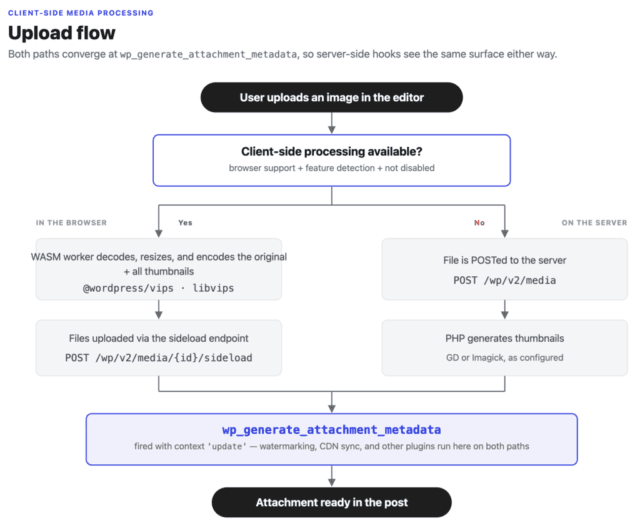
It’s worth noting that this feature requires browser support. Right now it’s fully supported in Chrome and Edge (from version 137), while Safari and Firefox don’t yet support that part of the technology. In those browsers, image processing still happens on the server. It remains to be seen when those browsers catch up.
New Notes features improve collaboration
Notes, the comment feature introduced in version 6.9, gets a serious upgrade in WordPress 7.1. You can now format text in your comments with bold, italics and direct links. There’s also the possibility to highlight a text selection instead of having to comment on an entire block.
Another new function is that you can tag colleagues with @-mentions, which sends an email notification to the person mentioned. Multiple people can leave comments on the same text selection and long comments now collapse automatically with a “show more” button so they don’t take over the screen.
Together, these send a clear signal about what they’re aiming for while real-time editing is still on hold (more on that below): to make asynchronous collaboration—that is, leaving comments and feedback without being in the document at the same time—as seamless as possible.
The admin interface has gotten several updates
Several accessibility improvements are included in the update, but we’d say the admin interface in particular has become more coherent and easier to navigate. The toolbar now sits at the top, visible at all times, where it used to disappear inside the post and page editor. The color scheme set in your profile now also applies in the Site Editor, which previously always had a black sidebar regardless of setting.
The command palette (Ctrl/Cmd+K) has gotten a clearer structure with commands grouped into sections, and a new “Identity” view in the Site Editor lets you change the site’s title, tagline, logo, and icon without leaving the editor.
Beyond the visual side, a large part of the updates is under the hood: improved contrast, clearer focus indicators and better support for keyboard and screen reader navigation across several admin pages. It’s the kind of thing that might not stand out in day-to-day work, but it makes the interface more accessible.
Why You Should Update Your WordPress
Updating your WordPress is important for several reasons, not least for security reasons. That’s why we’ve compiled some tips on what to consider before you start updating in a simple guide.
WordPress 7.1 is an update with many new (and impressive!) features
There’s plenty more beyond these three that we’ve mentioned, including:
- The Classic block stays in the block inserter by default. The plan to hide it was scrapped at the last minute after community discussion.
- Two new blocks: Tabs (organize content into tabs) and Playlist (embed playlists).
- Responsive styling directly in the editor. You can now set different appearances for mobile, tablet and desktop without CSS. In practice, developers no longer need to write CSS just to make a heading smaller on mobile or give a paragraph more margin on tablet. It can now be adjusted directly in the editor. You also control how blocks look on hover and focus.
For anyone who wants to read more, the full rundown is in the field guide.
Real-Time Collaboration is missing – again
For anyone who’s been wondering and searching in vain:
Real-Time Collaboration (RTC) still isn’t ready for launch.
The feature that lets multiple people write in the same post at the same time was tested throughout the 7.1 cycle but didn’t make it into this release either, same as with 7.0. Work continues on how to handle conflicts between editors and how the feature should work in practice.